


Mastering website optimization is crucial for ensuring lightning-fast load times. This concept is pivotal to improving both user experience and your site’s search engine ranking. In today’s digital age, speed is of the essence. A sluggish website can dramatically increase bounce rates and lower your chances of conversion. Through this article, we aim to guide you through the necessary steps to optimize your website for speed, making sure it runs smoothly and retains your visitors’ attention.
How to Optimize Your Website for Lightning-Fast Load Times
The journey to lightning-fast website performance begins with understanding the factors that influence load times. From images and videos to scripts and CSS, every element on your website plays a part. Optimizing these components can seem daunting, but with the right approach, you can significantly enhance your site’s speed. Let’s dive into the strategies that will help you achieve an optimally performing website.
Table of Contents
- Understanding the Importance of Speed in Website Optimization
- Analyzing Your Website’s Speed
- Key Optimization Strategies for Improving Website Speed
- Leveraging Browser Caching
- Optimizing Images and Videos for Faster Load Times
- Minimizing CSS and JavaScript to Speed Up Your Website
- Using a Content Delivery Network (CDN)
- Website Hosting and Its Impact on Speed
- Mobile Optimization for Speed
- Measuring the Success of Your Optimization Efforts
- Continual Optimization for Peak Performance
Understanding the Importance of Speed in Website Optimization
Before diving into the technicalities, let’s establish why speed is a cornerstone of website optimization. A fast-loading website not only enhances the user experience but also significantly contributes to your site’s SEO performance. Google has explicitly mentioned site speed as a ranking factor, which underscores its importance. The quicker your site loads, the better the user engagement, resulting in lower bounce rates and higher conversions.
Here’s why website speed should be your top priority:
- User Satisfaction: Users expect websites to load in 2 seconds or less. Anything more, and you risk losing their interest.
- SEO Rankings: Speed is a direct ranking factor in Google’s algorithm.
- “First Impressions”: A fast website reflects professionalism and reliability.
Analyzing Your Website’s Speed
Knowing that speed is vital, the next step is to measure your website’s current performance. Various tools can help with this, such as Google’s PageSpeed Insights, GTmetrix, and Pingdom. These tools provide detailed reports on your website’s load time and offer recommendations for improvement.
Key Metrics to Consider:
- First Contentful Paint (FCP)
- Largest Contentful Paint (LCP)
- Time to Interactive (TTI)
By using these metrics, you can get a clear picture of where your site stands and what specific areas need attention.
Key Optimization Strategies for Improving Website Speed
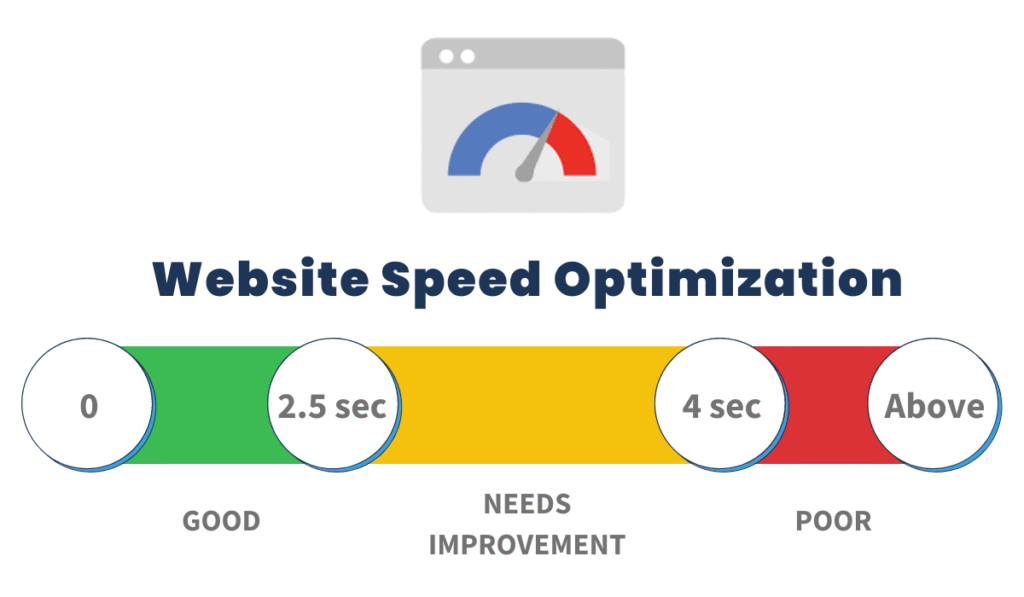
Achieving optimal website speed involves a multi-faceted approach. Here are several proven strategies that can help you improve your site’s performance:
- Optimize Your Code: Minify CSS, JavaScript, and HTML. Removing unnecessary characters from your code can speed up its processing.
- Reduce Redirects: Each redirect triggers an additional HTTP request which can delay page load.
- Improve Server Response Time: Look for performance bottlenecks like slow routing or a lack of adequate memory.
Implementing these strategies requires a mixture of technical know-how and careful planning. However, the effort is well worth it in terms of site performance and user satisfaction.
Leveraging Browser Caching
Browser caching is a technique that stores parts of your website in the user’s browser, so that it does not have to be reloaded each time they visit your site. This can significantly reduce load times for repeat visitors. Here’s how to make it work for you:
- Set expiration dates for your resources. This tells browsers how long to store cached versions before refreshing.
- Utilize ETags to help browsers identify when a cached resource has changed and needs to be updated.
Correctly configuring your server to make the best use of browser caching can lead to noticeable improvements in speed for returning users.
Optimizing Images and Videos for Faster Load Times

Media files can take up a significant portion of your site’s load time. By optimizing images and videos, you can slash this time without sacrificing quality. Here are some tips:
For Images:
- Compress images without losing quality. Tools like Adobe Photoshop, TinyPNG, or ImageOptim can help.
- Choose the right format: JPEG for photographs and complex images, PNG for transparency, and SVG for logos and icons.
- Implement lazy loading, so images only load when they enter the viewport.
For Videos:
- Consider hosting videos on external platforms like YouTube or Vimeo and embedding them on your site.
- Compress video files and use modern formats like WebM for faster, higher-quality video streaming.
- Use a thumbnail to delay loading the actual video until it’s clicked.
By applying these optimization techniques, you decrease the bandwidth needed for your site to load, thereby improving speed for your visitors.
Minimizing CSS and JavaScript to Speed Up Your Website
Excessive CSS and JavaScript not only bloat your website but also slow down its load time. Streamlining these resources can offer a significant speed boost. Begin by identifying and eliminating unused CSS and JavaScript. Tools such as PurifyCSS or UnCSS can help automate this process. Next, minify and combine files where possible. This reduces the number of HTTP requests and the size of files that browsers need to load.
Using a Content Delivery Network (CDN)
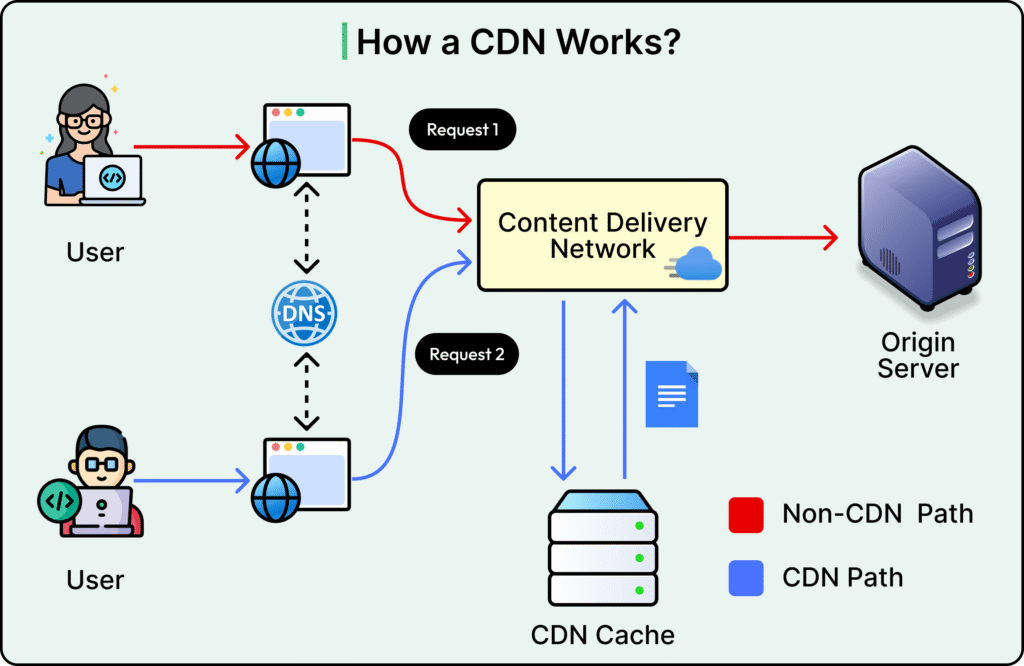
A Content Delivery Network (CDN) is a network of servers located around the globe, designed to deliver content to users more efficiently based on their geographic location. By storing copies of your static content (like images, JavaScript, and CSS) on these servers, a CDN can reduce the distance between users and this content, leading to faster load times. Implementing a CDN can drastically improve the speed and performance of your site for users worldwide.
Website Hosting and Its Impact on Speed
The choice of website hosting can significantly affect your site’s speed. Not all hosting services are created equal, and opting for a cheap, shared hosting plan can often lead to slow site speed due to overcrowded servers. Consider upgrading to a dedicated or cloud-based hosting solution to benefit from better resources and improved load times. Also, look for hosting providers that offer SSD (Solid State Drives) rather than HDD (Hard Disk Drives), as SSDs provide faster access to data.
Mobile Optimization for Speed
With more than half of web traffic coming from mobile devices, optimizing your website for mobile is no longer optional. Mobile users expect fast, responsive sites, and Google’s Mobile-First Indexing now prioritizes mobile site performance in its rankings. To ensure your site is up to speed, focus on responsive design, compress images appropriately, and consider implementing AMP (Accelerated Mobile Pages) for critical pages.
Test Your Site’s Mobile Performance
Google’s Mobile-Friendly Test and other tools can provide insights into how well your site performs on mobile devices and offer recommendations for improvement.
Measuring the Success of Your Optimization Efforts
It’s important to track the impact of your optimization efforts on your website’s performance. Tools like Google Analytics, Google PageSpeed Insights, and GTmetrix can help you monitor your site’s speed over time. Keep an eye on metrics such as page load times, bounce rates, and conversion rates to gauge the success of your optimizations. Regular monitoring helps identify new opportunities for improvement, ensuring your site remains fast and efficient.
Continual Optimization for Peak Performance
Website optimization for speed is not a one-time task but an ongoing journey. As web technologies evolve and your site grows, new optimization opportunities will arise. Stay abreast of the latest best practices in web performance and regularly audit your site to identify areas for improvement. Engage with your web development team to implement these enhancements and continue providing the best possible experience for your users.
“A fast website is the cornerstone of a strong digital presence.” By investing in website speed, you not only enhance user satisfaction but also bolster your SEO efforts, ultimately driving more traffic and conversions. Remember, in the world of the web, every second counts, so make sure your site is as fast as it can be.
Optimizing your website for lightning-fast load times is an essential part of today’s digital marketing and web development efforts. By following the steps outlined in this guide, you can improve your site’s performance, engage users more effectively, and achieve better results in search engine rankings. Let’s keep the web speedy, one site at a time.

Hello, I am Sajid, I have been working & writing for the Gibson team for over 4-years now. I help with keyword research, meta data insertion, content creation, and getting the project to the finish line. I also manage, organize, and publish helpful articles.